



Skip to content

What we build
for developers.

Every part, built for developers and new-build sales teams, and connected.

The whole cycle.

  1. Lead

    Found

    Someone looking for developers and new-build sales teams finds you on Google or in ChatGPT.

    GoogleChatGPTSEO service

  2. Your website

    They land on your website and tap Call.

    Your websiteWebsites service

  3. Prospect

    Missed call

    Nobody can pick up, so the missed call gets a text back in a minute.

    TwilioBooking service

  4. Qualified

    It follows up by text and asks what you would ask.

    ClaudeTwilioAI agents service

  5. Booked

    The visit is booked on your calendar, and they get it in writing.

    Google CalendarBooking service

  6. Client

    On the board

    The job moves across one board, and the crew gets it with the details.

    Your dashboardSlackLead generation service

  7. Maintained or closed

    Review asked

    After the job it asks every customer for a review and a referral.

    Google Business ProfileTwilioMarketing service

  8. Growth

    What worked

    PostHog shows what they did on your site, so the next campaign builds on it.

    PostHogMailchimpMarketing service

Lead

The website

A project site with floor plans, availability and a register interest form.

  • Free website, on a domain the project or the company keeps
  • An interactive site plan or stacking plan: each lot or unit marked available, reserved or sold
  • Floor plans, finishes and the design center on their own pages, renderings labelled as renderings
  • An interest list form worded for your stage: market testing, reservations or contracts
  • Search Console
  • Google Calendar
  • PostHog
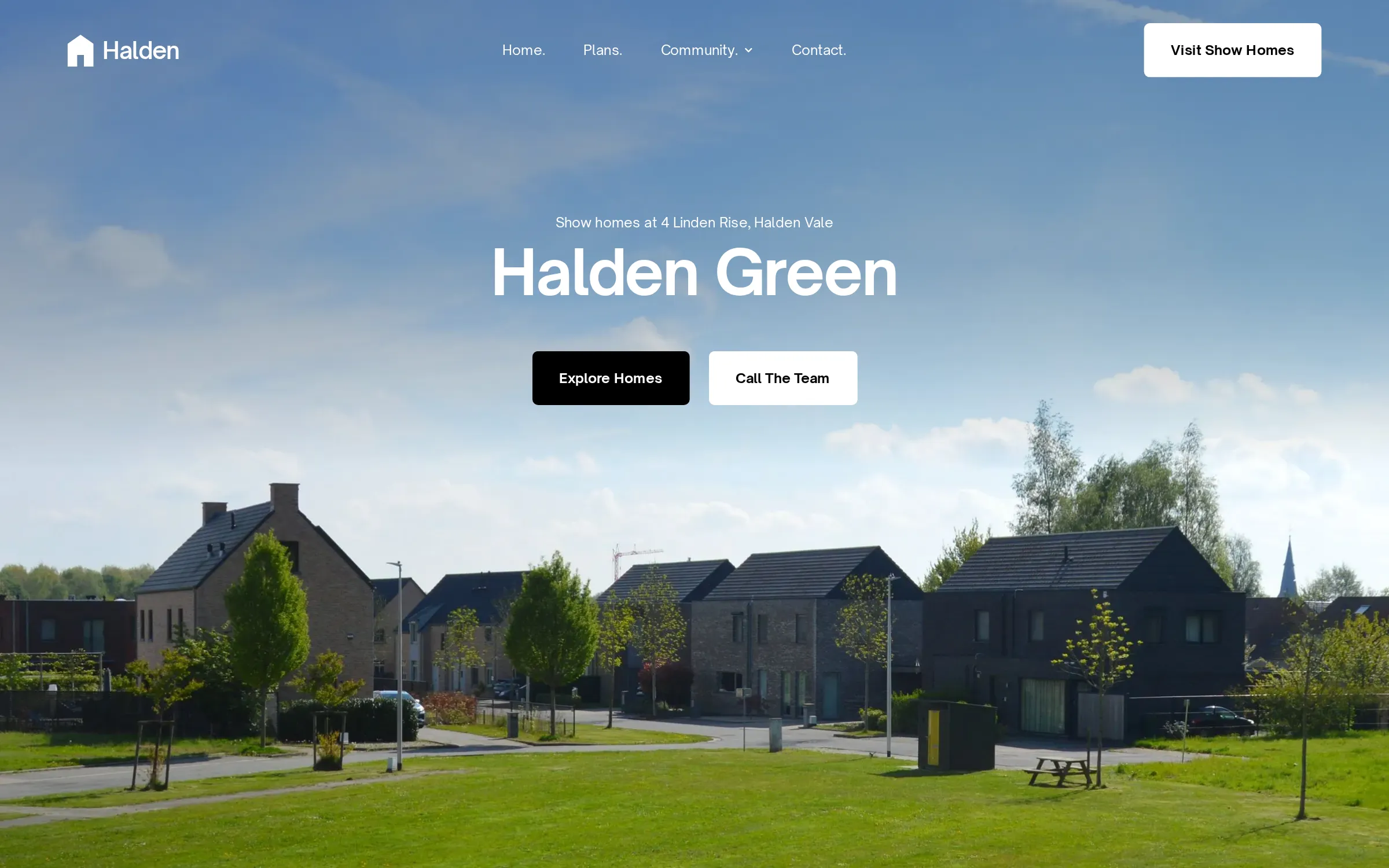
Halden, conceptHalden hero: the headline Halden Green over a new-build street of brick houses and a wide lawn under a blue sky, with Explore homes and Call the team buttons.
Developers

SEO

Community and floor plan pages that come up when buyers search new homes near them.

  • A page for each community, with the school district, commute, HOA and amenities in plain text
  • A page for each floor plan, with elevations, square footage and the communities that build it
  • Quick move-in pages that appear when a spec home lists and leave when it sells
  • A Google Business Profile for each staffed sales center, with model hours kept true
  • Google
  • Google Business Profile
  • Search Console

AEO

Answer pages on plans, finishes and timing that AI tools can quote to a new-home buyer.

  • Answer pages for the questions buyers bring: build timeline, design center choices, warranty, HOA dues
  • One current set of facts per community and phase, matched on your site, Google and NewHomeSource
  • Plan pages written so an engine can repeat them: bedrooms, baths, garage, single-story or two
  • A check of ChatGPT, Gemini and Perplexity each month for your communities, with who they name
  • ChatGPT
  • Gemini
  • Perplexity
  • Claude

Lead generation

A register interest form and a price list download that build your waitlist.

  • An interest list and VIP list, worded for market testing, reservations or contracts as your state and filing allow
  • Landing pages for each community, phase release and plan, every inquiry tagged with its source
  • A broker page with the co-op, the registration rule and the release calendar for local agents
  • Price-sheet and floor plan requests that ask for timing, financing and a home to sell
  • Google Ads
  • Meta
  • Gmail

Social posts

Construction progress and model home posts that keep the waitlist warm.

  • Progress posts from footings to framing to keys, with the community named in each
  • Floor plan walk-throughs and model videos you can reuse in emails and on plan pages
  • Phase release, quick move-in and design center posts on the platforms you pick
  • Buyer move-in posts, only with the buyer’s written permission
  • Facebook
  • Instagram
  • Nextdoor
  • LinkedIn

Prospect

AI agents

An AI agent answers plans, finishes and timing from the facts you give it.

  • An AI agent on community and plan pages that answers from your price sheet, plans and current incentives
  • Questions your OSC would ask: move timing, home to sell, financing, must-have rooms, working with an agent
  • A model tour or design center visit booked on the onsite agent’s calendar
  • A handoff to your online sales counselor whenever the buyer asks for a person or a price exception
  • Claude
  • Twilio
  • Messenger
  • WhatsApp

Missed calls

A missed call to the sales line gets a text back and a tour time.

  • A text within minutes of a missed call, from a registered number
  • The text offers times for a sales center tour
  • The thread lands on your dashboard, with the caller’s number on it
  • Your phone still rings as it does now; the text goes out only when nobody answers
  • Twilio
Sample missed call

Booking

Sales center tours and model home visits book into the sales team’s calendar.

  • Model tour and design center booking on each community and plan page
  • The buyer’s agent named at booking and registered before the first visit
  • Self-guided tour slots where your sales team runs them, with a person on call
  • Reminders and a one-tap reschedule, with directions to the sales center
  • Google Calendar
  • Calendly
  • Outlook

Client

The dashboard

Every registrant and buyer on one dashboard, from the first click to the contract.

  • Every lead, sales center tour and job in one list, with its stage
  • Each record keeps the texts, the photos and where the lead came from
  • Work sent to the right crew by text, email or Slack, with the tasks set
  • A reminder when a job sits too long in one stage
  • Google Calendar stays, and the dashboard sits beside it
  • Slack
  • Gmail
  • QuickBooks
Sample dashboardYour company

Maintained or closed

Reviews and referrals

After move-in, buyers get asked for a review and the name of a friend who is looking.

  • A text after every job asking how it went
  • A review ask to every customer, with nothing offered for it
  • A referral link they can send to a friend or a neighbor
  • A check-in reminder for the customers who stay on
  • Google Business Profile
  • Yelp
  • Twilio
Sample review request

Growth

Email campaigns

Phase releases and price updates go to the waitlist before they go public.

  • Your list sorted by plan type, budget, timing and community, renters apart from buyers
  • Phase release and price-change emails to the people who asked about that phase first
  • Lease-up sequences for each multifamily or build-to-rent building: tour invites, move-in specials, a follow-up after every tour
  • One concession or incentive, stated the same on your site, your ads and the leasing office sheet
  • Mailchimp
  • Resend
  • Gmail

PostHog analytics

PostHog shows which floor plans and phases buyers keep coming back to.

  • Which pages bring calls, forms and sales center tours, week by week
  • Where each visitor came from: Google, Maps, an AI answer, an ad or a post
  • The steps from the Floor plans page to the form, and where people stop
  • Search Console’s searches beside PostHog’s visits
  • PostHog
  • Search Console
Sample PostHog analyticsThis week

Session replay

Session replay shows where a buyer stopped on the price list or the form.

  • Replays of real visits to the Floor plans page
  • What people type into the form stays masked
  • Rage clicks and dead ends marked on the timeline
  • The fix goes live, and the next replays show whether it worked
  • PostHog
Sample session replay0:52

Monthly numbers

Each month you see registrants, tours booked and reservations signed, by phase.

  • Every request this month, where it came from and what it became
  • Sales center tours booked, quotes sent and jobs signed, with the money attached
  • How fast each lead got its first reply
  • What we change next month, and why
  • PostHog
  • QuickBooks
Sample monthly reportSample month

How it connects

Every registrant reaches one dashboard, and DocuSign stays for the reservation.

Free website

Sample calendar

Today

  • Showing booked